Best Smart Display for Seniors - Video Calling and Entertainment
AUTHOR: Carlos ParasUPDATED: January 5, 2026

With the ever growing senior population and more families deciding that aging in place is a better option than traditional nursing home living for their elderly loved ones, smart home devices are becoming more and more popular among this aging demographic.
Smart homes and smart devices offer many benefits for seniors. They can help seniors live independently for longer periods and give family members and caregivers peace of mind knowing that they can stay connected with their loved ones.
Smart displays are just one of the many smart home devices that can be beneficial to seniors. But, before we take a look at some of the popular smart displays on the market, let’s take a quick look at where smart displays evolved from – the smart speaker.
Smart speakers were revolutionary when they first appeared on the market, but not because the technology was new. The individual components of a smart speaker were already available. The revolution was in the utility of the parts once they were combined into one device.
What makes a smart speaker “smart” is the integration of a voice assistant. This feature allows the user to play music, control other smart home devices, get traffic and weather updates, and more, by speaking simple voice commands.
With the speed at which smart speakers have grown in popularity, it seems inevitable that manufacturers would eventually integrate a screen into the device. And so, the smart display was born.
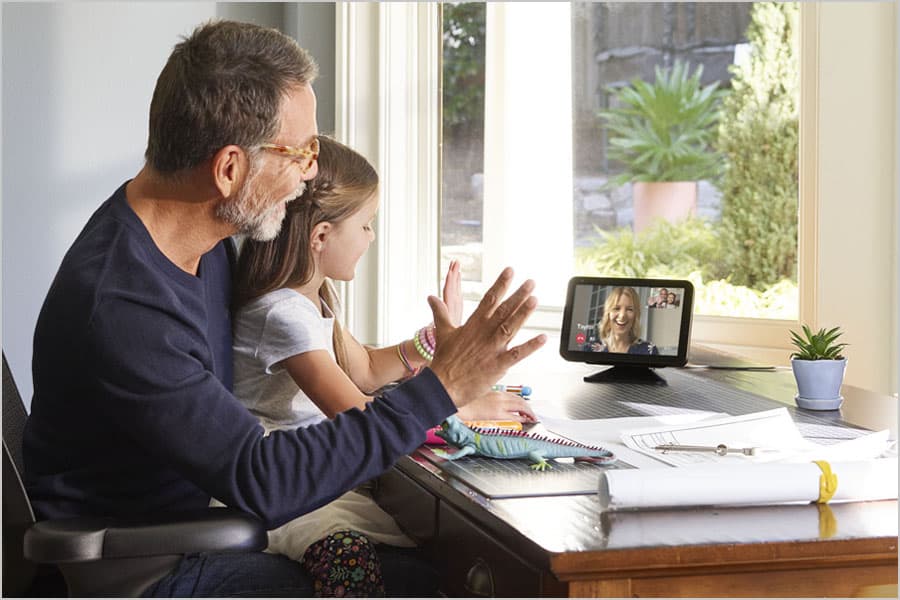
What is a smart display? A smart display is essentially a smart speaker with an integrated LCD touchscreen. The display allows users to view TV shows and movies, make video calls, send video messages, and show printed material such as books, recipes, news, and weather.
Smart displays also tend to have bigger speakers and better audio quality than their smart speaker counterparts.
Smart Home Deals @ AmazonHow to Shop for a Smart Display
No products found.
Depending on your particular needs, there are a variety of smart displays available. Your decision may end up being very easy once you’ve determined how you will be using your smart display. There are 5 main factors to consider when shopping for a smart display.
Display Size
First, you will want to consider the size of the actual display. Built-in LCD screens in smart displays can range anywhere from 4 inches to 15.6 inches diagonally. Depending on how often you will be watching videos or making video calls you will want to choose a size that works best for you. Screen resolution will range from 960 x 480 pixels, 1280 x 800 pixels, 1920 x 1080 pixels, and 1920 by 1200 pixels.
Video Camera
Some smart displays have a video camera to allow the user to make video calls and record live video. These front-facing cameras can range anywhere from 1MP to 12MP in video quality. With camera technology getting cheaper to produce, expect the video camera quality to improve over the next few years.
Sound Quality
The sound quality in smart displays is vastly improved over what is typically found in smart speakers. The larger size of smart displays allows room to use a larger speaker size.
While most smart displays are equipped with only one speaker, there are a few models that have 2 or more speakers installed, including separate woofers and tweeters. Speaker sizes and wattages vary, so be sure to check out the specs before purchasing.
Voice Assistant and System

If you already have a home automation system set up, you will want to make sure the smart display you choose is compatible with your existing system. Some of the most popular home automation systems available include: Amazon Alexa, Google Assistant, Hue, Nest, Ring, SmartThings, and Wink.
Most smart displays are designed to work only with certain systems, so you will want to plan accordingly.
If you don’t currently have a smart home system and you’re just starting out, you have a choice as to which home automation system you choose to build upon. You also have a choice as to which voice assistant you prefer to work with.
There are two main voice assistants used in smart displays: Amazon’s Alexa and Google Assistant. Alexa is by far the most widely integrated voice assistant today, but Google Assistant is quickly catching up.
Streaming Services and Apps
There are many different streaming services and apps available, but you’ll have to do some research to find out which services and apps work on a particular smart display. Some smart display manufacturers restrict the services they allow on their system. And likewise, some services will only allow access to certain smart displays.
For example, you can find Prime Video and Apple Music on Amazon smart displays, but not on Google devices. You can stream video and music with YouTube on Google smart displays, but not on Amazon devices. And unfortunately, you can’t stream Netflix on either Amazon or Google smart displays.
Best Smart Displays
Amazon Echo Show 15
No products found.
The No products found. (link to Amazon) is a full HD 15.6" smart display with a 5MP camera. You can choose to mount it in a portrait or landscap orientation.
The on-screen widget can help you and your family stay on track with calendars, personal sticky notes, to-do lists, shopping lists, and assigned reminders. And with Alexa on board, you can control the display and manage tasks with simple voice commands.
Get recipe ideas, shop for and add ingredients to your shopping cart, or order takeout with the help of the Echo Show 15. See options from local restaurants, get food delivered from Whole Foods Market or Amazon Fresh, order Blue Apron meal kits. You can even get pizza delivered from Domino's!
Use Alexa to control smart home devices, listen to music or audio books, check on the news and weather.
Stream Amazon Music, Prime Video and even Hulu, along with a slew of other services. Compatible with Android, Apple iOS, and Fire OS. No products found..
Amazon Echo Show 10 (3rd Gen)

The third generation Amazon Echo Show 10 (link to Amazon) has a more streamlined look than it’s predecessor. It is available in 2 colors: Charcoal and Glacier White. The Echo Show features a 10.1-inch LCD touch screen display. It has a rotating screen with manual tilt.
In addition to the HD display, the Echo Show has two 1” tweeters and a 3" woofer. This gives the new Echo Show much better sound quality than the previous version. And with Alexa on board, you can adjust the treble, mids, and bass with voice commands.
The 13-megapixel, front-facing camera can be used for making video calls and sending video messages to friends and family who have Skype, the Alexa app, Echo Spot, or Echo Show. In addition, you can make voice calls and send messages to almost anyone.
Use Alexa to control smart home devices, listen to music or audio books, check on the news and weather. The Echo Show even comes with a built-in Zigbee hub to connect to other smart devices.
Stream Amazon Music, Prime Video and even Hulu, along with a slew of other services. Compatible with Android, Apple iOS, and Fire OS. Check prices, reviews, and more at Amazon.
Facebook Portal

The Facebook Portal (link to Amazon) focuses more on the messaging aspects of a smart display. But don’t worry, it also has Amazon’s Alexa built-in, so you can control other smart home devices, listen to music, check the news, and more.
What sets the Portal apart from other smart displays is it’s front-facing camera. Not only is it 13-megapixels, but it features a technology Facebook calls, “Smart Camera" which uses Artificial Intelligence (AI) and Computer Vision (CV) modeling.
Smart Camera can pan, zoom in or out, and basically follow whoever is speaking on camera as they move around the room. It does this by identifying human shapes, making sure they are always in frame. This makes video calling easy since you won’t have to constantly adjust the camera if you’re moving around or multi-tasking.
The Portal has a 10-inch touchscreen display with a resolution of 1280 x 800 pixels. It has front facing stereo speakers and a rear woofer. You can connect to apps like Spotify, Pandora, iHeartRadio, YouTube, CNN, and the Food Network. Compatible with Hue, Nest, SmartThings, and Wink. Check prices, reviews, and more at Amazon .
Facebook Portal TV

Another great option is the Facebook Portal TV (link to Amazon) which gives you smart video calling on the biggest screen in your home: your TV. It allows you to video call with friends and family using Messenger and WhatsApp even if they don't have a Portal.
The Portal TV is equipped with Smart Camera which automatically pans and zooms, so you can move and talk freely and always stay in frame. The Portal TV connects to Wi-Fi on either the 2.4Ghz or 5Ghz channel. It also has Amazon’s Alexa built-in, so you can control your smart home devices, listen to your favorite music, watch the news, and more hands-free by using voice commands.
Enjoy movies and shows from Portal TV's growing list of app partners like: Showtime, STARZ, CBS all access, the Fodd Network, Prime video, iHeart Radio, and Pandora. You can even display photos from Facebook, Instagram, and your smartphone’s camera roll with the Superframe feature. Check prices, reviews, and more at Amazon .
Google Nest Hub Max
The Google Nest Hub Max is Google’s entry into the 10-inch smart display market. It comes in either a charcoal or chalk color and has a HD touchscreen display with a resolution of 1280 x 800 pixels. It has two front-facing stereo speakers and one rear subwoofer.
The Nest Hub Max has a built-in Nest Cam with a 6.5-megapixel camera. Face match technology can recognize up to six different users and will show specific content and apps for each user. With gesture control, you can use hand gestures to control certain aspects of the device like sound or video controls.
Google Assistant allows you to control other smart home devices like the Nest Learning Thermostat (link to Amazon) and the Nest x Yale Lock (link to Amazon). The Nest Hub Max is compatible with Arlo, Hue, Nest, Ring, SmartThings, and Wink.
Chromecast is built in so you can stream movies and TV shows from Google Play Movies, HBO NOW, Hulu and more. Check prices, reviews, and more at Best Buy.
Recommended Products
About the Author